A blog for Confluence group.

Sunday, 28 January 2024

AzureHunter - A Cloud Forensics Powershell Module To Run Threat Hunting Playbooks On Data From Azure And O365


A Powershell module to run threat hunting playbooks on data from Azure and O365 for Cloud Forensics purposes.


Getting Started

1. Check that you have the right O365 Permissions

The following roles are required in Exchange Online, in order to be able to have read only access to the UnifiedAuditLog: View-Only Audit Logs or Audit Logs.

These roles are assigned by default to the Compliance Management role group in Exchange Admin Center.

NOTE: if you are a security analyst, incident responder or threat hunter and your organization is NOT giving you read-only access to these audit logs, you need to seriously question what their detection and response strategy is!

More information:

NOTE: your admin can verify these requirements by running Get-ManagementRoleEntry "*\Search-UnifiedAuditLog" in your Azure tenancy cloud shell or local powershell instance connected to Azure.


2. Ensure ExchangeOnlineManagement v2 PowerShell Module is installed

Please make sure you have ExchangeOnlineManagement (EXOv2) installed. You can find instructions on the web or go directly to my little KB on how to do it at the soc analyst scrolls


3. Either Clone the Repo or Install AzureHunter from the PSGallery

3.1 Cloning the Repo
  1. Clone this repository
  2. Import the module Import-Module .\source\AzureHunter.psd1

3.2 Install AzureHunter from the PSGallery

All you need to do is:

Install-Module AzureHunter -Scope CurrentUser
Import-Module AzureHunter

What is the UnifiedAuditLog?

The unified audit log contains user, group, application, domain, and directory activities performed in the Microsoft 365 admin center or in the Azure management portal. For a complete list of Azure AD events, see the list of RecordTypes.

The UnifiedAuditLog is a great source of cloud forensic information since it contains a wealth of data on multiple types of cloud operations like ExchangeItems, SharePoint, Azure AD, OneDrive, Data Governance, Data Loss Prevention, Windows Defender Alerts and Quarantine events, Threat intelligence events in Microsoft Defender for Office 365 and the list goes on and on!


AzureHunter Data Consistency Checks

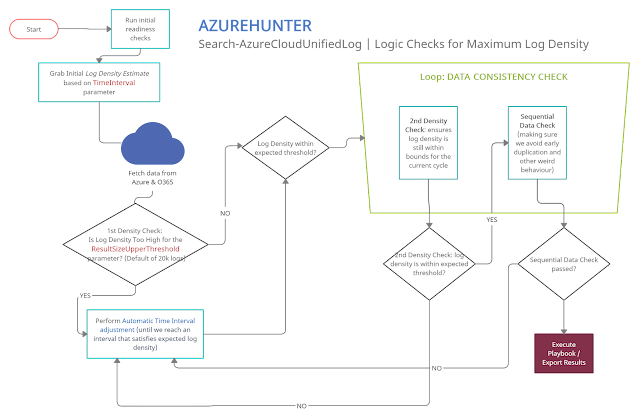
AzureHunter implements some useful logic to ensure that the highest log density is mined and exported from Azure & O365 Audit Logs. In order to do this, we run two different operations for each cycle (batch):

  1. Automatic Window Time Reduction: this check ensures that the time interval is reduced to the optimal interval based on the ResultSizeUpperThreshold parameter which by default is 20k. This means, if the amounts of logs returned within your designated TimeInterval is higher than ResultSizeUpperThreshold, then an automatic adjustment will take place.
  2. Sequential Data Check: are returned Record Indexes sequentially valid?


Usage

Ensure you connect to ExchangeOnline

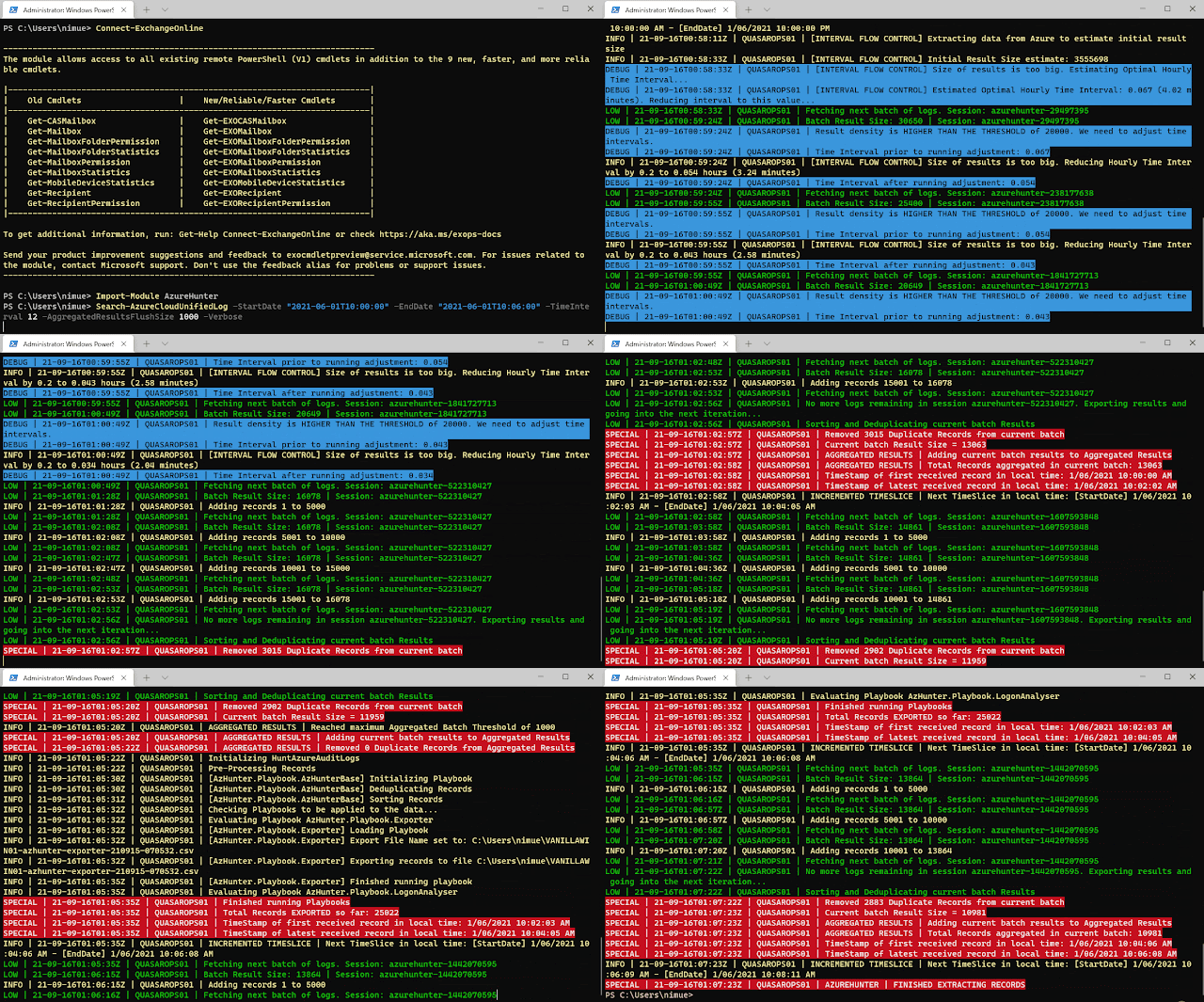
It's recommended that you run Connect-ExchangeOnline before running any AzureHunter commands. The program checks for an active remote session and attempts to connect but some versions of Powershell don't allow this and you need to do it yourself regardless.


Run AzureHunter

AzureHunter has two main commands: Search-AzureCloudUnifiedLog and Invoke-HuntAzureAuditLogs.

The purpose of Search-AzureCloudUnifiedLog is to implement a complex logic to ensure that the highest percentage of UnifiedAuditLog records are mined from Azure. By default, it will export extracted and deduplicated records to a CSV file.

The purpose of Invoke-HuntAzureAuditLogs is to provide a flexible interface into hunting playbooks stored in the playbooks folder. These playbooks are designed so that anyone can contribute with their own analytics and ideas. So far, only two very simple playbooks have been developed: AzHunter.Playbook.Exporter and AzHunter.Playbook.LogonAnalyser. The Exporter takes care of exporting records after applying de-duplication and sorting operations to the data. The LogonAnalyser is in beta mode and extracts events where the Operations property is UserLoggedIn. It is an example of what can be done with the playbooks and how easy it is to construct one.

When running Search-AzureCloudUnifiedLog, you can pass in a list of playbooks to run per log batch. Search-AzureCloudUnifiedLog will pass on the batch to the playbooks via Invoke-HuntAzureAuditLogs.

Finally Invoke-HuntAzureAuditLogs can, be used standalone. If you have an export of UnifiedAuditLog records, you can load them into a Powershell Array and pass them on to this command and specify the relevant playbooks.


Example 1 | Run search on Azure UnifiedAuditLog and extract records to CSV file (default behaviour)
Search-AzureCloudUnifiedLog -StartDate "2020-03-06T10:00:00" -EndDate "2020-06-09T12:40:00" -TimeInterval 12 -AggregatedResultsFlushSize 5000 -Verbose

This command will:

  • Search data between the dates in StartDate and EndDate
  • Implement a window of 12 hours between these dates, which will be used to sweep the entire length of the time interval (StartDate --> EndDate). This window will be automatically reduced and adjusted to provide the maximum amount of records within the window, thus ensuring higher quality of output. The time window slides sequentially until reaching the EndDate.
  • The AggregatedResultsFlushSize parameter speficies the batches of records that will be processed by downstream playbooks. We are telling AzureHunter here to process the batch of records once the total amount reaches 5000. This way, you can get results on the fly, without having to wait for hours until a huge span of records is exported to CSV files.

Example 2 | Run Hunting Playbooks on CSV File

We assume that you have exported UnifiedAuditLog records to a CSV file, if so you can then do:

$RecordArray = Import-Csv .\my-exported-records.csv
Invoke-HuntAzureAuditLogs -Records $RecordArray -Playbooks 'AzHunter.Playbook.LogonAnalyser'

You can run more than one playbook by separating them via commas, they will run sequentially:

$RecordArray = Import-Csv .\my-exported-records.csv
Invoke-HuntAzureAuditLogs -Records $RecordArray -Playbooks 'AzHunter.Playbook.Exporter', 'AzHunter.Playbook.LogonAnalyser'

Why?

Since the aftermath of the SolarWinds Supply Chain Compromise many tools have emerged out of deep forges of cyberforensicators, carefully developed by cyber blacksmith ninjas. These tools usually help you perform cloud forensics in Azure. My intention with AzureHunter is not to bring more noise to this crowded space, however, I found myself in the need to address some gaps that I have observed in some of the tools in the space (I might be wrong though, since there is a proliferation of tools out there and I don't know them all...):

  1. Azure cloud forensic tools don't usually address the complications of the Powershell API for the UnifiedAuditLog. This API is very unstable and inconsistent when exporting large quantities of data. I wanted to develop an interface that is fault tolerant (enough) to address some of these issues focusing solely on the UnifiedAuditLog since this is the Azure artefact that contains the most relevant and detailed activity logs for users, applications and services.
  2. Azure cloud forensic tools don't usually put focus on developing extensible Playbooks. I wanted to come up with a simple framework that would help the community create and share new playbooks to extract different types of meaning off the same data.

If, however, you are looking for a more feature rich and mature application for Azure Cloud Forensics I would suggest you check out the excellent work performed by the cyber security experts that created the following applications:

I'm sure there is a more extensive list of tools, but these are the ones I could come up with. Feel free to suggest some more.


Why Powershell?
  1. I didn't want to re-invent the wheel
  2. Yes the Powershell interface to Azure's UnifiedAuditLog is unstable, but in terms of time-to-production it would have taken me an insane amount of hours to achieve the same thing writing a whole new interface in languages such as .NET, Golang or Python to achieve the same objectives. In the meanwhile, the world of Cyber Defense and Response does not wait!

TODO
  • Specify standard playbook metadata attributes that need to be present so that AzureHunter can leverage them.
  • Allow for playbooks to specify dependencies on other playbooks so that one needs to be run before the other. Playbook chaining could produce interesting results and avoid code duplication.
  • Develop Pester tests and Coveralls results.
  • Develop documentation in ReadTheDocs.
  • Allow for the specification of playbooks in SIGMA rule standard (this might require some PR to the SIGMA repo)

More Information

For more information


Credits


More info


  1. Hackers Toolbox
  2. Hacker Security Tools
  3. Pentest Tools Apk
  4. Nsa Hacker Tools
  5. Hacking App
  6. Hacker Tools Linux
  7. Free Pentest Tools For Windows
  8. Hacker Tools
  9. Hack Apps
  10. Hack Tools Mac
  11. Hacker Search Tools
  12. Hacking Tools For Pc
  13. Pentest Tools Linux
  14. Hacking Tools Free Download
  15. Android Hack Tools Github
  16. Hack Tools Mac
  17. Usb Pentest Tools
  18. Hacker Tools For Ios
  19. Hacking Tools For Games
  20. Hack Tools For Games
  21. Tools Used For Hacking
  22. Hacking Tools Name
  23. Pentest Tools Framework
  24. Hacking Tools For Mac
  25. Pentest Tools For Windows
  26. Top Pentest Tools
  27. Nsa Hacker Tools
  28. Hacker Tools 2020
  29. Pentest Tools Alternative
  30. Hacker Tools For Pc
  31. Hack Tools
  32. Hacking Tools And Software
  33. Pentest Reporting Tools
  34. Termux Hacking Tools 2019
  35. Hack Tools Online
  36. Hack Tools Mac
  37. Pentest Recon Tools
  38. Usb Pentest Tools
  39. Hack Tools Github
  40. Hacking Tools
  41. Hacker Tools 2020
  42. Hacking Tools Windows 10
  43. Hacker Search Tools
  44. Hacker Tools For Windows
  45. Pentest Recon Tools
  46. Hacker Tools For Ios
  47. Hacker Tools Github
  48. How To Hack
  49. Hacker Tools Free
  50. Free Pentest Tools For Windows
  51. Pentest Tools Subdomain
  52. Hacker Tools For Ios
  53. Hacking Tools 2020
  54. Hack Rom Tools
  55. Computer Hacker
  56. Hacker Tools Windows
  57. Hack Tools For Windows
  58. What Is Hacking Tools
  59. Pentest Tools Website
  60. Hack Tool Apk
  61. Kik Hack Tools
  62. Pentest Automation Tools
  63. Hacking Tools
  64. Pentest Recon Tools
  65. Hack Apps
  66. Black Hat Hacker Tools
  67. New Hack Tools
  68. Nsa Hack Tools
  69. Hacker Tools 2020
  70. Hacking App
  71. Pentest Tools Android
  72. Top Pentest Tools
  73. Pentest Tools Framework
  74. Hack Tools For Games
  75. Nsa Hack Tools Download
  76. Hack Tools For Windows
  77. Hackers Toolbox
  78. Pentest Tools Nmap
  79. Hacking Tools Pc
  80. Pentest Tools Review
  81. Hacker Tools

$$$ Bug Bounty $$$

What is Bug Bounty ?


A bug bounty program, also called a vulnerability rewards program (VRP), is a crowdsourcing initiative that rewards individuals for discovering and reporting software bugs. Bug bounty programs are often initiated to supplement internal code audits and penetration tests as part of an organization's vulnerability management strategy.


Many software vendors and websites run bug bounty programs, paying out cash rewards to software security researchers and white hat hackers who report software vulnerabilities that have the potential to be exploited. Bug reports must document enough information for for the organization offering the bounty to be able to reproduce the vulnerability. Typically, payment amounts are commensurate with the size of the organization, the difficulty in hacking the system and how much impact on users a bug might have.


Mozilla paid out a $3,000 flat rate bounty for bugs that fit its criteria, while Facebook has given out as much as $20,000 for a single bug report. Google paid Chrome operating system bug reporters a combined $700,000 in 2012 and Microsoft paid UK researcher James Forshaw $100,000 for an attack vulnerability in Windows 8.1.  In 2016, Apple announced rewards that max out at $200,000 for a flaw in the iOS secure boot firmware components and up to $50,000 for execution of arbitrary code with kernel privileges or unauthorized iCloud access.


While the use of ethical hackers to find bugs can be very effective, such programs can also be controversial. To limit potential risk, some organizations are offering closed bug bounty programs that require an invitation. Apple, for example, has limited bug bounty participation to few dozen researchers.

Related links


  1. Tools 4 Hack
  2. Hacker Tools Free Download
  3. Physical Pentest Tools
  4. Tools For Hacker
  5. Hacking Tools Pc
  6. Hacker Tools Github
  7. Hacker
  8. Pentest Box Tools Download
  9. Tools 4 Hack
  10. Hacker Tools Apk
  11. Hack And Tools
  12. Hacker Tools For Ios
  13. Pentest Automation Tools
  14. Hacker Tools For Pc
  15. Pentest Tools Port Scanner
  16. What Is Hacking Tools
  17. Pentest Tools Port Scanner
  18. Hacker Tools For Pc
  19. Pentest Tools Nmap
  20. Hacker Hardware Tools
  21. What Are Hacking Tools
  22. Hack Tools
  23. Hacker Tools Apk Download
  24. Hacker Tools For Ios
  25. Hacking Apps
  26. Hacker Tools Linux
  27. Free Pentest Tools For Windows
  28. Termux Hacking Tools 2019
  29. Hacking Tools 2019
  30. Hack Tools For Windows
  31. Pentest Tools Tcp Port Scanner
  32. Hacker Tools For Windows
  33. Hacking Tools For Beginners
  34. Hacker Tools 2020
  35. Hacker Tools Apk
  36. World No 1 Hacker Software
  37. Physical Pentest Tools
  38. How To Install Pentest Tools In Ubuntu
  39. Hacking Apps
  40. Physical Pentest Tools
  41. Tools 4 Hack
  42. Pentest Tools Linux
  43. Pentest Tools For Windows
  44. Android Hack Tools Github
  45. Hacking Tools Download
  46. Hacker Tools For Mac
  47. Hack Tools For Pc
  48. Pentest Tools Framework
  49. Nsa Hack Tools Download
  50. Hacking Tools And Software
  51. Underground Hacker Sites
  52. Hacker
  53. Hack Tools
  54. Hacker Tools For Mac
  55. Hack Apps
  56. Tools 4 Hack
  57. Pentest Tools Linux
  58. Hacking Apps
  59. Hacker Tools Online
  60. Hacking Tools For Kali Linux
  61. Hack Tool Apk No Root
  62. Pentest Tools
  63. Hacker Tools Mac
  64. Hacker Tools Mac
  65. Pentest Tools Linux
  66. Hacking Tools And Software
  67. Hacking Tools
  68. Pentest Tools Bluekeep
  69. Hacking Tools For Beginners
  70. Pentest Tools Nmap
  71. Pentest Tools Android
  72. Hacking Tools Pc
  73. Hacker Tools Apk Download
  74. Hack Tools Download
  75. Hacking App
  76. Hacker Tools Hardware
  77. Hacker Tools For Pc
  78. Hacking Tools 2019
  79. Free Pentest Tools For Windows
  80. New Hacker Tools
  81. Hack Tools For Mac
  82. Underground Hacker Sites
  83. Hackrf Tools
  84. Hacking Tools For Pc
  85. Bluetooth Hacking Tools Kali
  86. Hacking Tools Pc
  87. Hacking Tools For Windows 7
  88. Pentest Tools Open Source
  89. Hacking Tools Mac
  90. Hacks And Tools
  91. Pentest Tools Tcp Port Scanner
  92. Pentest Tools For Windows
  93. Pentest Recon Tools
  94. Hack Tools Github
  95. Hacking Tools For Games
  96. Nsa Hack Tools Download
  97. Top Pentest Tools
  98. Hacking Tools Online
  99. Tools For Hacker
  100. Beginner Hacker Tools
  101. Hacking Tools Pc
  102. Pentest Tools Tcp Port Scanner
  103. Kik Hack Tools
  104. Pentest Reporting Tools
  105. Hacking Tools For Windows
  106. Hacking Tools Mac
  107. Android Hack Tools Github
  108. Pentest Tools Download
  109. Hacking Tools Online
  110. Hacker Tools For Mac
  111. Hacker Tools Software
  112. Hacker Techniques Tools And Incident Handling
  113. Hacker Tools For Ios
  114. Hacker Search Tools
  115. Pentest Tools Apk
  116. Android Hack Tools Github
  117. Hack Tools Mac
  118. Pentest Tools
  119. Pentest Tools Nmap
  120. Hacker Tools For Mac
  121. Bluetooth Hacking Tools Kali
  122. Bluetooth Hacking Tools Kali
  123. Hacker Search Tools
  124. Hack Tools 2019
  125. Hak5 Tools
  126. Pentest Tools Bluekeep
  127. Pentest Tools
  128. Hacking Tools For Windows 7
  129. Pentest Tools Framework
  130. Game Hacking
  131. Hacker Tools Linux
  132. Pentest Reporting Tools
  133. Tools Used For Hacking
  134. Pentest Automation Tools
  135. Install Pentest Tools Ubuntu
  136. Install Pentest Tools Ubuntu
  137. New Hacker Tools
  138. Hacking Tools 2020
  139. Pentest Automation Tools
  140. Hacker Tools For Pc
  141. Hacking Tools Kit
  142. Hacking Tools Name
  143. Nsa Hack Tools
  144. Best Pentesting Tools 2018
  145. Bluetooth Hacking Tools Kali
  146. Tools Used For Hacking
  147. Game Hacking
  148. Beginner Hacker Tools
  149. Pentest Tools Url Fuzzer
  150. Game Hacking
  151. Github Hacking Tools
  152. Hacker Hardware Tools
  153. Hack Tools Mac
  154. Android Hack Tools Github
  155. Best Hacking Tools 2019
  156. Hacking Apps
  157. Easy Hack Tools
  158. Hacker Tools Free
  159. Hacking Tools

Saturday, 27 January 2024

CEH Practical: Information-Gathering Methodology


Information gathering can be broken into seven logical steps. Footprinting is performed during the first two steps of unearthing initial information and locating the network range.


Footprinting

Footprinting is defined as the process of establishing a scenario or creating a map of an organization's network and systems. Information gathering is also known as footprinting an organization. Footprinting is an important part of reconnaissance process which is typically used for collecting possible information about a targeted computer system or network. Active and Passive both could be Footprinting. The example of passive footprinting is assessment of a company's website, whereas attempting to gain access to sensitive information through social engineering is an example of active information gathering. Basically footprinting is the beginning step of hacker to get hacked someone because having information about targeted computer system is the main aspect of hacking. If you have an information about individual you wanna hack so you can easily hacked that individual. The basic purpose of information gathering is at least decide what type of attacks will be more suitable for the target. Here are some of the pieces of information to be gathered about a target
during footprinting:
  • Domain name
  • Network blocks
  • Network services and applications
  • System architecture
  • Intrusion detection system
  • Authentication mechanisms
  • Specific IP addresses
  • Access control mechanisms
  • Phone numbers
  • Contact addresses
Once this information is assemble, it can give a hacker better perception into the organization, where important information is stored, and how it can be accessed.

Footprinting Tools 

Footprinting can be done using hacking tools, either applications or websites, which allow the hacker to locate information passively. By using these footprinting tools, a hacker can gain some basic information on, or "footprint," the target. By first footprinting the target, a hacker can eliminate tools that will not work against the target systems or network. For example, if a graphics design firm uses all Macintosh computers, then all hacking software that targets Windows systems can be eliminated. Footprinting not only speeds up the hacking process by eliminating certain tool sets but also minimizes the chance of detection as fewer hacking attempts can be made by using the right tool for the job. Some of the common tools used for footprinting and information gathering are as follows:
  • Domain name lookup
  • Whois
  • NSlookup
  • Sam Spade
Before we discuss these tools, keep in mind that open source information can also yield a wealth of information about a target, such as phone numbers and addresses. Performing Whois requests, searching domain name system (DNS) tables, and using other lookup web tools are forms of open source footprinting. Most of this information is fairly easy to get and legal to obtain.

Footprinting a Target 

Footprinting is part of the preparatory pre-attack phase and involves accumulating data regarding a target's environment and architecture, usually for the purpose of finding ways to intrude into that environment. Footprinting can reveal system vulnerabilities and identify the ease with which they can be exploited. This is the easiest way for hackers to gather information about computer systems and the companies they belong to. The purpose of this preparatory phase is to learn as much as you can about a system, its remote access capabilities, its ports and services, and any specific aspects of its security.

DNS Enumeration

DNS enumeration is the process of locating all the DNS servers and their corresponding records for an organization. A company may have both internal and external DNS servers that can yield information such as usernames, computer names, and IP addresses of potential target systems.

NSlookup and DNSstuff

One powerful tool you should be familiar with is NSlookup (see Figure 2.2). This tool queries DNS servers for record information. It's included in Unix, Linux, and Windows operating systems. Hacking tools such as Sam Spade also include NSlookup tools. Building on the information gathered from Whois, you can use NSlookup to find additional IP addresses for servers and other hosts. Using the authoritative name server information from Whois ( AUTH1.NS.NYI.NET ), you can discover the IP address of the mail server.

Syntax

nslookup www.sitename.com
nslookup www.usociety4.com
Performing DNS Lookup
This search reveals all the alias records for www.google.com and the IP address of the web server. You can even discover all the name servers and associated IP addresses.

Understanding Whois and ARIN Lookups

Whois evolved from the Unix operating system, but it can now be found in many operating systems as well as in hacking toolkits and on the Internet. This tool identifies who has registered domain names used for email or websites. A uniform resource locator (URL), such as www.Microsoft.com , contains the domain name ( Microsoft.com ) and a hostname or alias ( www ).
The Internet Corporation for Assigned Names and Numbers (ICANN) requires registration of domain names to ensure that only a single company uses a specific domain name. The Whois tool queries the registration database to retrieve contact information about the individual or organization that holds a domain registration.

Using Whois

  • Go to the DNSStuff.com website and scroll down to the free tools at the bottom of the page.
  • Enter your target company URL in the WHOIS Lookup field and click the WHOIS button.
  • Examine the results and determine the following:
    • Registered address
    • Technical and DNS contacts
    • Contact email
    • Contact phone number
    • Expiration date
  • Visit the company website and see if the contact information from WHOIS matches up to any contact names, addresses, and email addresses listed on the website.
  • If so, use Google to search on the employee names or email addresses. You can learn the email naming convention used by the organization, and whether there is any information that should not be publicly available.

Syntax

whois sitename.com
whois usociety4.com

Related news